
A broken ComfyUI workflow is easier to diagnose when the error, workflow and environment are kept together. Claude can help turn those details into a testable troubleshooting plan. It should not guess which random custom-node package you need or recommend reinstalling everything as the first step.
Checked: 10 November 2026. Features and menu labels can vary by plan, workspace and rollout.
Before you start
A backup copy of the workflow, the exact error text and details of the ComfyUI environment. Record whether you are using Local, Desktop or Cloud, plus relevant versions, models and custom nodes. Remove credentials, private file paths and other unnecessary details before sharing JSON or logs.
1. Reproduce the smallest failure
Open a copy of the workflow and record what happens. Does it fail to load, show missing node types or stop when you run it? Keep the exact error rather than paraphrasing it as “it does not work”. That distinction helps separate a dependency problem from an invalid connection or model issue.
2. Attach the relevant evidence
Give Claude the workflow JSON and the specific error, with a short environment summary. State how the file was exported and where you intend to use it. A regular editor workflow and an API-format workflow serve different purposes; check the format expected by the destination.
3. Ask for an evidence-led diagnosis
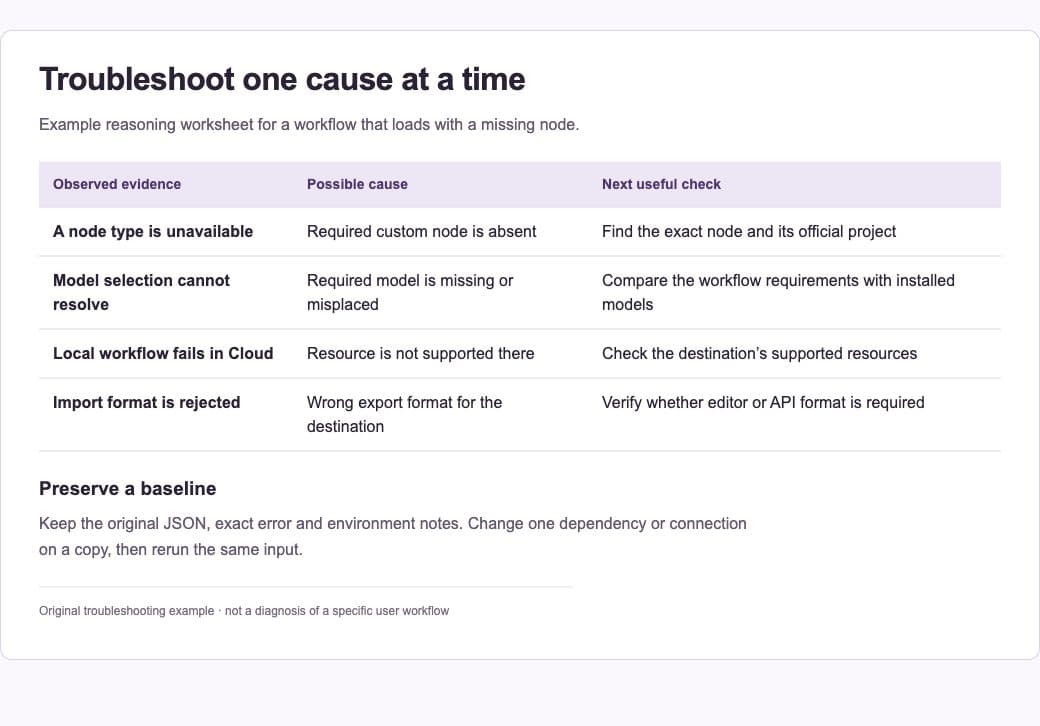
Request a table of observed evidence, possible cause and the next check that would distinguish it from alternatives. Ask Claude to identify which conclusions are uncertain. Missing nodes can reflect unavailable custom nodes, missing models or differences between environments; they do not all have the same repair.
4. Verify dependency sources
If a node or model appears to be missing, locate its official project or documented requirement. Check whether it is supported in the environment you are using. Comfy Cloud has a managed set of available resources, so a workflow that runs locally may need a different supported path there.
5. Change one thing on a copy
Apply the smallest justified repair and run the relevant section again. Preserve the original file and record the change. Avoid mixing a model replacement, several new node packages and a large software update in the same attempt; that makes it harder to know what fixed or broke the workflow.
6. Save a working baseline
When the workflow runs, save the file with its model and dependency notes. Record the environment and a small known input. Keep the troubleshooting summary with the workflow so the same issue is easier to recognise when moving between machines or services.
A prompt to adapt
Analyse this ComfyUI workflow and exact error. Environment: [Local/Desktop/Cloud, versions and relevant dependencies]. First distinguish observed facts from hypotheses. Return a table: evidence, possible cause, check to run and smallest reversible repair. Identify uncertain node or model requirements and verify their official sources. Do not invent package names, run commands or change the workflow yet.
Check the result
Test the repaired workflow with the same input and inspect the output. Check that the fix did not silently replace a model or alter an important setting. A JSON file can be syntactically valid while still depending on unavailable resources or producing the wrong result.
Common questions
Should I install every missing-looking node package?
First establish the exact required node and its trusted source. A similar package name is not enough. Check platform support and avoid running unreviewed installation commands from a model answer.
Why does the workflow run locally but fail in Cloud?
The available nodes, models and environment configuration can differ. Compare the workflow requirements with the supported resources in the destination and adapt it deliberately.
Official references
- Comfy: missing nodes and workflows that will not load
- Comfy: workflow format and deployment requirements
- Anthropic: Projects
Keep going
Explore the existing ComfyUI introduction alongside current official setup guidance. You can also build a first brief with our free prompt generator.