
Claude Research can help investigate a question across multiple sources. To get a useful comparison, give it a decision to support and a standard for evidence. This walkthrough keeps the investigation on public product documentation, so it does not require access to a private inbox or drive.
Checked: 10 November 2026. Features and menu labels can vary by plan, workspace and rollout.
Before you start
A Claude plan and account offering Research, with web search enabled. Check the current plan and platform requirements in Anthropic’s documentation. Use a fresh chat and a specific comparison, such as choosing a tool for short Mac software tutorials.
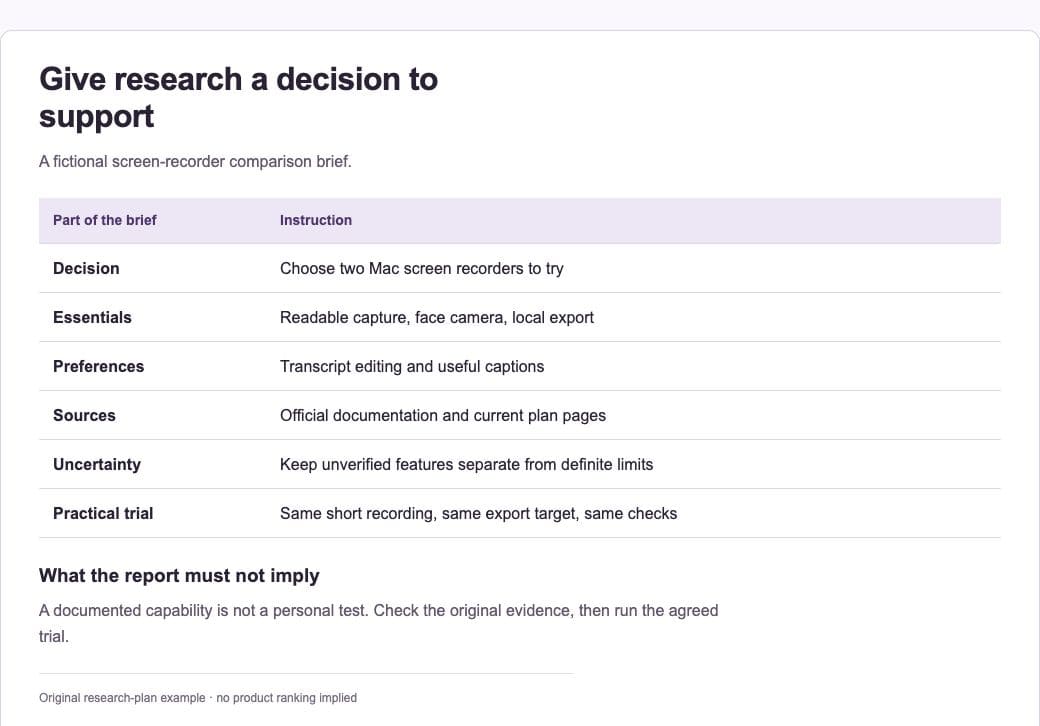
1. Write the selection criteria
Separate essential features from preferences. For example, require readable screen capture and local exports, then treat transcript editing as a preference. Name the operating system, intended audience and practical constraints. This prevents the report from becoming a broad catalogue of unrelated features.
2. Enable the right research tools
Open the plus menu and choose Research where available. Anthropic’s guidance requires web search to be enabled for Research. Check the visible research state before starting. If the control is absent, confirm availability for your account rather than following instructions from a different rollout.
3. Limit the source set
Request official product documentation, release notes and pricing pages first. Ask for a checked date and exact links for decisive claims. Independent reviews can be useful for a separate opinion section, but should not silently become the evidence for a technical limit.
4. Keep connected sources intentional
Research may use supported, enabled connectors. Connect only what the question requires and what you are authorised to use. This public comparison does not need private apps. Anthropic notes platform differences: mobile Research is web-only, and local MCP servers are not a source for Research.
5. Review the evidence table
For each essential feature, open the cited page. Mark whether the claim is confirmed, contradicted or not verified. Look for plan differences and old documentation. Ask Claude to preserve those distinctions instead of converting every blank cell into a definite “no”.
6. Define a small practical trial
Turn the findings into two or three tests you can run yourself. Record the same source material, export settings and success criteria for each finalist. Keep the source-based comparison and the hands-on observations separate, then make the decision using both.
A prompt to adapt
Use Research to compare [tools] for [specific workflow]. Essentials: [list]. Preferences: [list]. Prefer current official documentation and give a source for each material feature claim. Record dates and plan or platform limits. Separate verified facts, inferences and unresolved questions. Finish with a short trial plan; do not claim you have personally tested the products.
Check the result
Check the rows that would rule a tool in or out. A report can be well organised while still misreading a source. Confirm current prices directly before paying, and treat a recommendation as a judgement based on your stated criteria, not a universal ranking.
Common questions
Can Research use my local MCP server?
Anthropic’s current Research guidance distinguishes supported research sources from local MCP servers. Use the documented supported connectors, and test access to the intended source rather than assuming every connected tool is available to Research.
What if web search is off?
Enable it if the account allows it and the task needs current public evidence. Otherwise label the work as a draft comparison that still needs independent source checking.
Official references
Keep going
Compare this method with ChatGPT Deep Research. You can also build a first brief with our free prompt generator.