
A reference image and a good text prompt should work together. ChatGPT can help describe the intended result and separate fixed details from the things you want to change. Midjourney still interprets the reference; a longer prompt does not guarantee an identical character or composition.
Checked: 10 November 2026. Features and menu labels can vary by plan, workspace and rollout.
Before you start
An image you have permission to use, ChatGPT and Midjourney access. Decide whether you are aiming for subject content, composition, visual style or a precise edit. Those are different tasks and can require different reference controls in the current Midjourney interface.
1. Describe what must stay
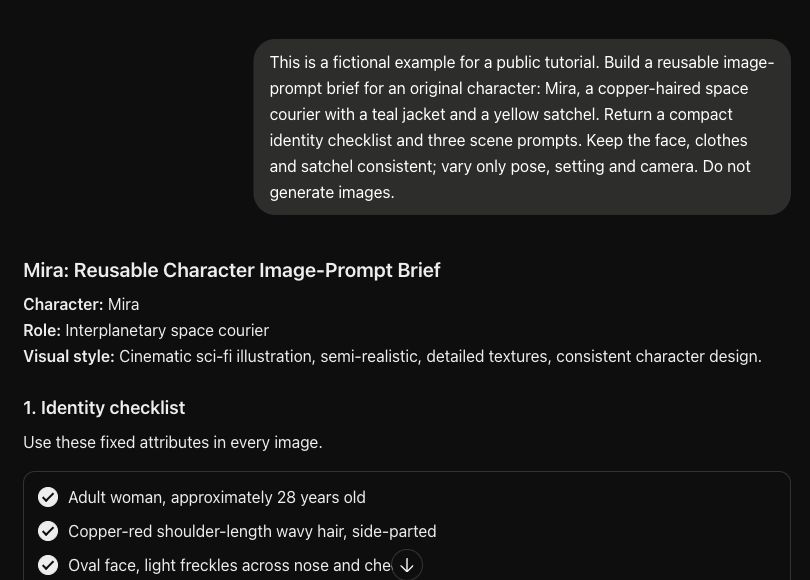
Write a short list of the subject’s important attributes and the composition you want to preserve. For an original character, include distinctive clothing, hair and accessories. Avoid asking the model to infer a private person’s identity or add facts that the image does not establish.
2. Name what may change
Separate pose, setting, lighting and camera position from the identity details. If the request says both “keep the same composition” and “change to an overhead close-up”, resolve that conflict before generating. Ask ChatGPT to flag contradictions rather than bury them in a string of modifiers.
3. Ask for a compact image brief
Provide the reference where supported and ask ChatGPT for a short factual description, a fixed-attributes checklist and one finished text prompt. Tell it to label assumptions. The prompt should describe the image you want to see, rather than relying on vague instructions to improve the reference.
4. Add the reference in Midjourney
In Midjourney’s web interface, use the image icon in the Imagine bar to upload or select the image, then use the appropriate reference area. The official Image Prompts guidance distinguishes image prompts from other reference tools. Check the controls for the model version you are using.
5. Start with restrained settings
Use one clear prompt and a sensible aspect ratio. Avoid copying version-specific weights from an old tutorial without checking current documentation. Midjourney uses image references as guidance, so choose the relevant editing workflow when you need a precise change to an existing image.
6. Compare one change at a time
Keep the reference and main description fixed while testing a single change, such as camera distance. Save the prompt, reference type, model and relevant settings beside each result. Judge whether the important identity details survived before adding more scene complexity.
A prompt to adapt
Help me prepare a Midjourney image prompt from my own reference. First list the visible attributes to preserve. Then separate the requested changes: [changes]. Flag any conflicting requirements or uncertain visual detail. Return one concise prompt describing the final image, plus a checklist I can use to compare the result. Do not invent model versions, parameters or identity facts.
Check the result
Compare the result against the fixed-attributes checklist. Check the accessories, silhouette, colours and composition separately. In our original character example, a consistent written brief provides useful guidance, but the actual image still needs inspection and iteration.
Common questions
Should I use an image prompt for every reference task?
Use the reference type suited to the task. Midjourney offers different reference and editing controls. The current official guidance explains the differences; an image prompt is not a promise of exact copying.
Can I paste an old image-weight value into any model?
Check the supported range and behaviour for the model version in use. Version-specific parameters can change, and a setting copied from an older guide may not behave as expected.
Official references
Keep going
Extend the same identity brief into a short storyboard. You can also build a first brief with our free prompt generator.