
Character consistency starts before image generation. A small identity brief and a clear shot list make it easier to notice unwanted changes. ChatGPT can organise those details into a storyboard you can use with your chosen image and video tools, while keeping the creative decisions reviewable.
Checked: 10 November 2026. Features and menu labels can vary by plan, workspace and rollout.
Before you start
An original character idea, references you have permission to use and a short story goal. Our example uses Mira, a fictional space courier with a teal jacket and a yellow satchel. No real person’s identity is needed for the exercise.
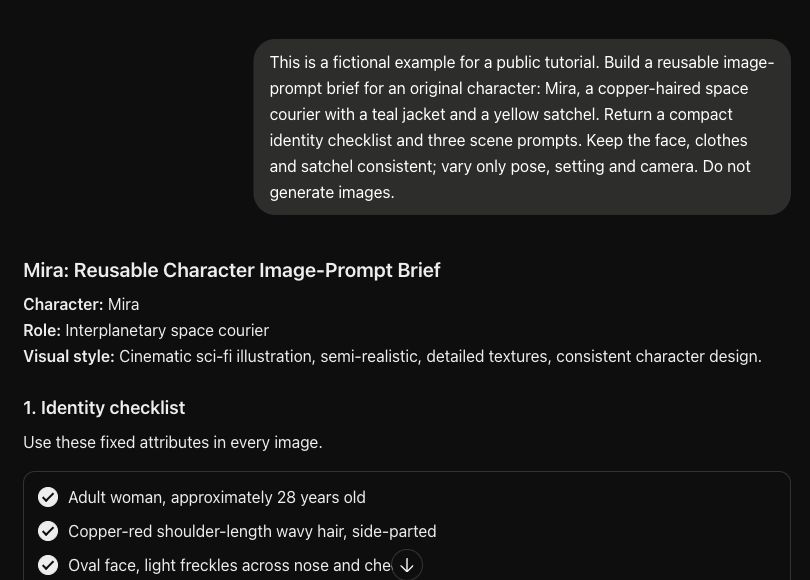
1. Create an identity sheet
List the features that must remain stable: face description, hair, outfit, proportions and distinctive accessories. Separate visible details from backstory. A long biography will not necessarily help an image model preserve a jacket fastening or the side on which a bag is worn.
2. Set the scene-level variables
Choose what may change between shots: action, environment, framing, lighting and camera position. Keep those changes out of the identity checklist. If a scene requires an outfit change, label it as an intentional continuity exception rather than leaving the model to guess.
3. Ask for a shot table
Request a short sequence with one main action per shot. Include shot number, duration, action, camera, fixed identity details and any reference needed. A three- to five-shot sequence is easier to review than a long story with many simultaneous movements.
4. Generate prompts from the same brief
Ask ChatGPT to build each scene prompt from the approved identity sheet. Do not let it rewrite the character’s defining attributes for variety. Keep a compact version of the identity description that you can reuse across image and video stages.
5. Build and inspect references
Create a clear reference image in your chosen tool, then use the supported reference controls for subsequent images. Inspect the actual results against the identity sheet. A written prompt can guide consistency but does not guarantee that every generated frame will preserve all details.
6. Review the sequence as a whole
Place the shots in order and check hair, clothing, accessories, screen direction and changes in setting. Resolve continuity problems before spending time on longer animation or final editing. Keep the prompts and accepted references together so a replacement shot starts from the same approved material.
A prompt to adapt
Create a five-shot storyboard for this original character: [identity brief]. Story goal: [goal]. Keep all identity attributes fixed unless I explicitly request a change. Vary only action, setting, lighting and camera. Return a table with shot, duration, action, camera, continuity requirements and an image prompt. Flag contradictions and do not claim the prompts guarantee consistent generated images.
Check the result
Compare every accepted shot with the same checklist. Pay special attention to small accessories and silhouette, which often drift even when the overall style looks consistent. Test a short motion before committing to a longer clip, and review the assembled sequence rather than only its individual frames.
Common questions
Will the same prompt produce the same character every time?
Do not rely on that. Use the tool’s supported reference controls and inspect the results. Prompt text, model, settings and references all affect the outcome.
Should every shot contain lots of action?
Start with one clear action per shot. Simpler movement is easier to evaluate and gives you more control when an image-to-video tool interprets the scene.
Official references
Keep going
Prepare a reference-image prompt, then record a walkthrough of your process. You can also build a first brief with our free prompt generator.