
Retyping the same brand instructions in every chat wastes time and makes inconsistencies likely. A ChatGPT Project gives related work a shared home for chats, files and instructions. The important part is deciding what belongs in the reusable brief and what belongs only in the current assignment.
Checked: 10 November 2026. Features and menu labels can vary by plan, workspace and rollout.
Before you start
A ChatGPT account with Projects available and a short, approved brand document. Use a fictional business while learning. Projects, file limits and sharing controls can differ between accounts; check the controls shown in your workspace.
1. Create a focused project
Open Projects in the ChatGPT interface where it is available and create a project for one brand or workstream. Choose a clear name such as “Copper Kettle Studio — content”. Keep unrelated clients in separate projects so their facts and terminology are easier to distinguish.
2. Separate facts from preferences
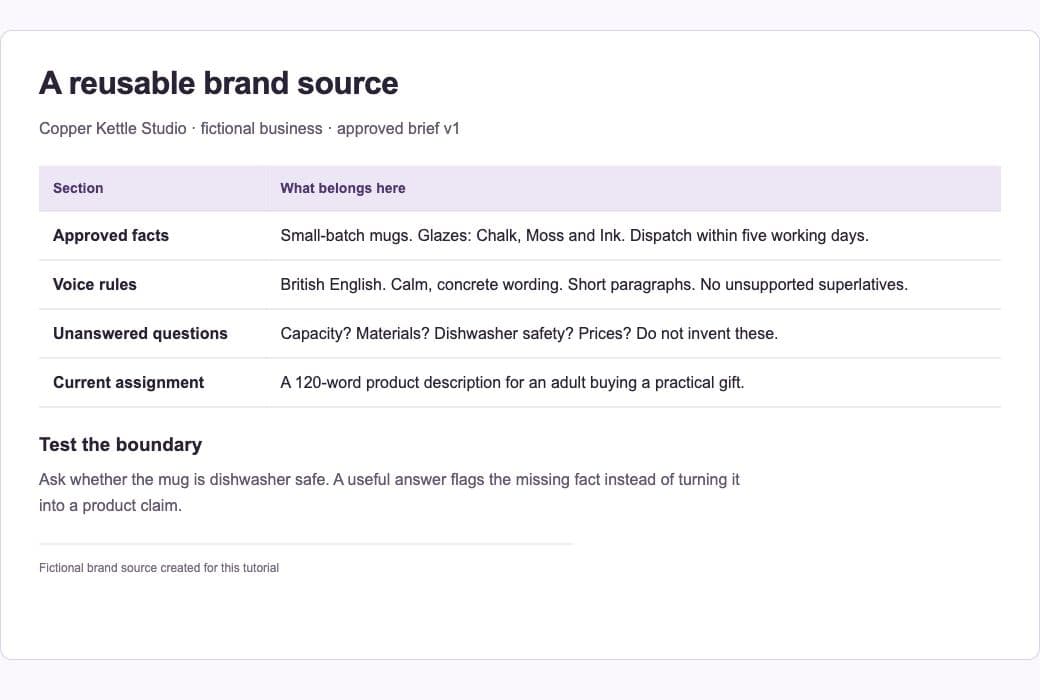
Prepare a brief with two sections. Approved facts might include product names and a dispatch promise. Preferences might include British English, short paragraphs and a calm tone. Add a third section for unresolved questions. This prevents a style instruction from being mistaken for evidence about the business.
3. Add the brief as a source
Upload the approved document or add a supported source through the project’s source controls. Use readable filenames and include a version date inside the document. Remove superseded copies when appropriate; conflicting versions make it harder to tell which fact should govern a draft.
4. Write practical project instructions
Describe the audience, preferred voice and recurring output rules. Tell ChatGPT to flag missing product facts and avoid inventing prices or certifications. Keep one-off campaign requirements in the relevant chat. Project instructions should stay useful across several assignments.
5. Test it with a small task
Start a project chat and request a short product description using only the supplied facts. Then ask for a checklist showing which claims came from the source and which details still need approval. Inspect the source yourself. A convincing attribution can still be wrong.
6. Maintain the source, not a pile of corrections
When a business fact changes, update the approved brief and record the change. Test an old, representative request again. Before sharing the project, review its files and membership controls so the people involved see only the material intended for them.
A prompt to adapt
Use the approved brand brief in this Project. Draft a 120-word product description for [product] for [audience]. Follow the project’s voice rules. Use only supplied product facts. Return the draft, a claim-to-source checklist and any questions that block publication. Do not invent prices, delivery promises or environmental claims.
Check the result
Test with a request that tempts the model to invent an attractive detail. For example, ask whether a mug is dishwasher safe when the brief does not say. The useful result is a clear question or omission. Also start a second project chat and check that the recurring voice rules still apply.
Common questions
Does a web Project read my whole computer?
No. A web project uses sources available through its supported controls. Do not assume it can inspect an arbitrary local folder just because you named it in a message.
What if the draft ignores the brief?
Check that the correct source is present, remove contradictory versions and make the instruction more concrete. Show a short acceptable example and ask the next draft to follow its observable qualities.
Official references
Keep going
Compare the same brand-brief method in Claude Projects. You can also build a first brief with our free prompt generator.