
Consistency comes from a useful brief and a repeatable check, not from asking an AI to “sound on brand”. This guide sets up a Claude Project for a fictional ceramics shop and tests both the writing style and the factual boundaries of its output.
Checked: 10 November 2026. Features and menu labels can vary by plan, workspace and rollout.
Before you start
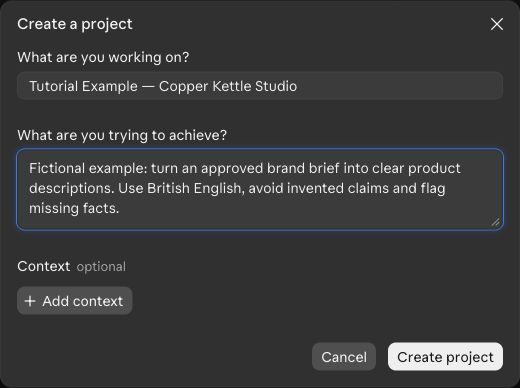
A Claude account with Projects, an approved brief and a short example of acceptable writing. Claude is rolling out a newer Projects experience, so your account may show different controls. The screenshot captures the Create a project dialog visible in our account, using fictional information.
1. Create a project for one workstream
Open Projects and choose New project. Use a name that makes the scope easy to recognise. In the current setup dialog, explain the goal and add relevant context where offered. Keep unrelated businesses and confidential source sets separate.
2. Add approved facts as reference material
Create a short document containing product names, factual claims you may use and unresolved questions. Add it through the project’s knowledge or context controls. In the newer experience, look for the relevant Context or Library area. In classic Projects, use project knowledge.
3. Write observable voice rules
Specify British English, preferred sentence length, the audience and a few examples. “Calm, concrete language; no invented sustainability claims” is easier to evaluate than “premium but friendly”. In classic Projects, Set project instructions applies recurring guidance across project chats. Use the corresponding controls offered in your account.
4. Keep assignment details in the chat
Tell Claude which product, audience and format the current task concerns. Do not keep changing the whole project brief for a single social post. Ask it to use the approved facts and list missing information separately from the draft.
5. Test the boundary with a missing fact
In our fictional example, the supplied facts name three glazes and a dispatch window, but say nothing about dishwasher safety. Ask for a product description and a fact-check table. The model should not invent a care claim simply because it would make the description more persuasive.
6. Update the source when facts change
Keep a clear version of the approved brief. Remove or mark superseded material and test a representative request again. In classic Projects, do not assume details mentioned in one chat automatically become shared knowledge for every other chat; put enduring information into the project’s reference material.
A prompt to adapt
Use the approved brand brief for this fictional shop. Write a three-sentence product description for [product] for [audience]. Follow these voice rules: [rules]. Return the draft, the supplied facts used and questions still needing an answer. Do not invent prices, materials, certifications, care instructions or delivery promises. If a claim is unsupported, leave it out and ask.
Check the result
Compare the draft with the source document and the good writing example. Then try a second task in a new project chat. Check whether the same facts and style rules apply. A project name is a useful label; it should not be the only place you put the information needed to do the work.
Common questions
Why do my project controls look different?
Anthropic is rolling out a newer Projects experience. Follow the controls in your account and its current documentation. Classic instructions about knowledge and project instructions may not match every label in the newer interface.
Should I upload every company document?
Start with the smallest approved source set that supports the task. Remove redundant versions and unnecessary personal information. More material is not automatically clearer context.
Official references
Keep going
Use the same approved-brief approach in ChatGPT Projects. You can also build a first brief with our free prompt generator.