
A Search Console export is more useful than a generic list of “high-volume AI keywords”. It shows the queries for which your own site is already appearing. In this workflow, ChatGPT helps organise that evidence into a short editorial queue. You still make the decision about what deserves a new article, an update or no action.
Checked: 10 November 2026. Features and menu labels can vary by plan, workspace and rollout.
Before you start
Access to your site’s Google Search Console performance report, a query export and a ChatGPT account that can read the file. Use a consistent date range and search type. This guide’s example data is fictional; do not confuse it with a traffic forecast.
1. Export a clean report
In Search Console, open Performance on Search results, select a useful date range and choose Web unless you are deliberately studying another search type. Record any query, country, device or page filters. Export the report so you can see queries, clicks, impressions, CTR and average position.
2. Tell ChatGPT what the columns mean
Attach the export and ask it to list sheets, row counts, column names and missing values before recommending topics. Ask it to preserve the original query text. Do not let an early summary silently discard queries with zero clicks; those rows may reveal visibility without visits.
3. Group related searches
Ask for groups based on the searcher’s intended task, such as installing a tool, using a reference image or checking a feature. Keep brand searches separate from instructional searches. Inspect a sample from each group so that similar words with different meanings do not get merged.
4. Identify the right kind of action
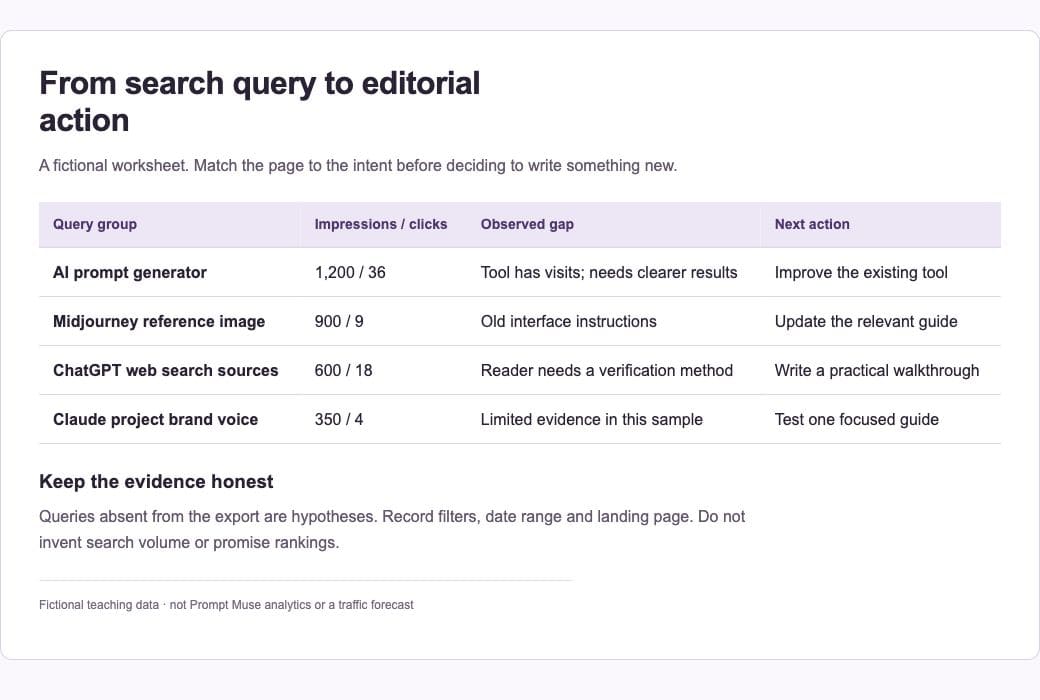
A relevant page with impressions and weak clicks may need clearer intent, a better title or current instructions. Several pages serving the same task may need consolidation. A new article is appropriate when you can answer a real question that the site does not already cover well.
5. Check the landing page
Return to Search Console and inspect the page receiving those impressions. Read the live article. Does it answer the query, still work and offer a useful next step? An old publication date alone is not a reason to delete it. Broken instructions and obsolete products are stronger reasons for a substantial update or retirement.
6. Create a small editorial queue
Request five actions with the supporting queries, target page, proposed change and a validation step. Add genuinely new subject areas as experiments. Queries absent from your export are hypotheses, not demonstrated demand. Review the next comparable reporting period after publishing, allowing for indexing and ordinary variation.
A prompt to adapt
Analyse this Search Console export. First verify the sheets, columns and row counts. Group queries by the task behind the search, keeping brand queries separate. Propose five content actions using only evidence in the file. For each, show the supporting queries, existing page, recommended action, uncertainty and how to evaluate it later. Do not invent search volume or promise rankings.
Check the result
Recalculate the totals and one CTR yourself. CTR is clicks divided by impressions; do not add percentages across rows. Average position is contextual, not a universal rank. Check that the recommended page actually matches the query and that no filter has narrowed the report without being recorded.
Common questions
Can I upload client data?
Use only data you are authorised to share with the AI service. Remove unnecessary identifiers and follow the account’s data settings. A fictional sample is sufficient to learn the workflow.
Should I target every query with impressions?
No. Relevance, the site’s expertise and the usefulness of the answer matter. An unrelated phrase or a query about a retired service can be a poor fit even when it has many impressions.
Official references
Keep going
Check current facts with ChatGPT web search before writing the resulting brief. You can also build a first brief with our free prompt generator.