
ChatGPT can search the web directly. The useful skill is getting an answer you can trace back to evidence. This walkthrough turns a vague question about AI tools into a short research brief with links, dates and clear gaps. It works well for a creator checking a feature before recording a tutorial.
Checked: 10 November 2026. Features and menu labels can vary by plan, workspace and rollout.
Before you start
A ChatGPT account with web search available, a specific question and permission to use any files you attach. Start a fresh conversation for a clean example. You do not need an API key or a third-party browser extension for ChatGPT’s built-in web search.
1. Define the decision, not just the subject
Replace “tell me about screen recorders” with a question such as “Which of these three Mac screen recorders supports local projects and transcript editing?” Name the products, operating system and features that matter. A narrower question makes missing evidence easier to notice.
2. Choose web search
Open the plus menu beside the message box and choose Web search if it appears. You can also explicitly ask ChatGPT to search the web. For information that changes, include a date or ask for the date checked. If your interface differs, check the tools available in your account rather than installing an extension to imitate an older tutorial.
3. Set a source standard
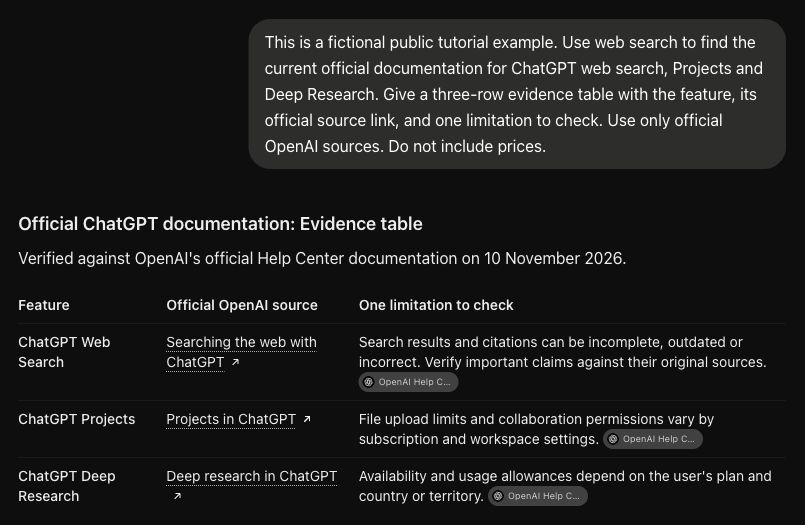
Ask for official product documentation and release notes first. Request a table with one claim per row, the exact supporting page and an uncertainty column. A product homepage may support a general feature, while a help page is usually better for a precise limit.
4. Open the citations
Click through the links that support the important claims. Confirm that the destination exists, refers to the correct product and actually says what the answer attributes to it. A source can be authentic while failing to support a particular sentence.
5. Separate evidence from interpretation
Mark confirmed facts separately from recommendations. “Supports transcript editing” is a feature claim; “best for beginners” is a judgement that needs criteria. Ask ChatGPT to label inferences, regional differences and anything it could not verify.
6. Save a useful research note
Keep the question, source URLs, date checked and unresolved items beside your draft. Before publishing or buying, revisit the few details most likely to change. For a tutorial, those are often menu names, account requirements and export limits.
A prompt to adapt
Use web search to compare [tools] for [specific workflow]. Prefer official documentation. Return a table: claim, supporting URL, date checked, limitation or uncertainty. Label your recommendations as recommendations. If a source does not confirm a detail, write “not verified”. Do not invent prices or sources.
Check the result
Pick three claims at random and verify them independently. Then check every claim that would affect a purchase or a published instruction. Our screenshot shows an example evidence table produced in ChatGPT; the links still need human checking. A polished table is an organising aid, not proof that each row is correct.
Common questions
Why did ChatGPT answer without searching?
An ordinary chat can answer from existing knowledge. Explicitly request web search and inspect whether the answer provides usable sources. If browsing is unavailable, ask it to identify the facts that require a separate check.
When should I use Deep Research instead?
Use ordinary search for a focused question. A comparison with several constraints and many sources may suit Deep Research, if your account offers it. Define the scope before starting either workflow.
Official references
Keep going
Use the fact-checking workflow before turning your research into an article. You can also build a first brief with our free prompt generator.