
When the result needs its own space, an Artifact is more useful than a long chat response. Claude’s current Artifacts experience supports standalone outputs such as documents and presentations. This tutorial turns a small fictional brand brief into an editable document, with a deliberate review before sharing.
Checked: 10 November 2026. Features and menu labels can vary by plan, workspace and rollout.
Before you start
A Claude account with the relevant Artifact and file-creation features enabled. Available artifact types can vary. Use a brief that you are authorised to share, and state whether the output is a draft, a reference document or something ready for a named audience.
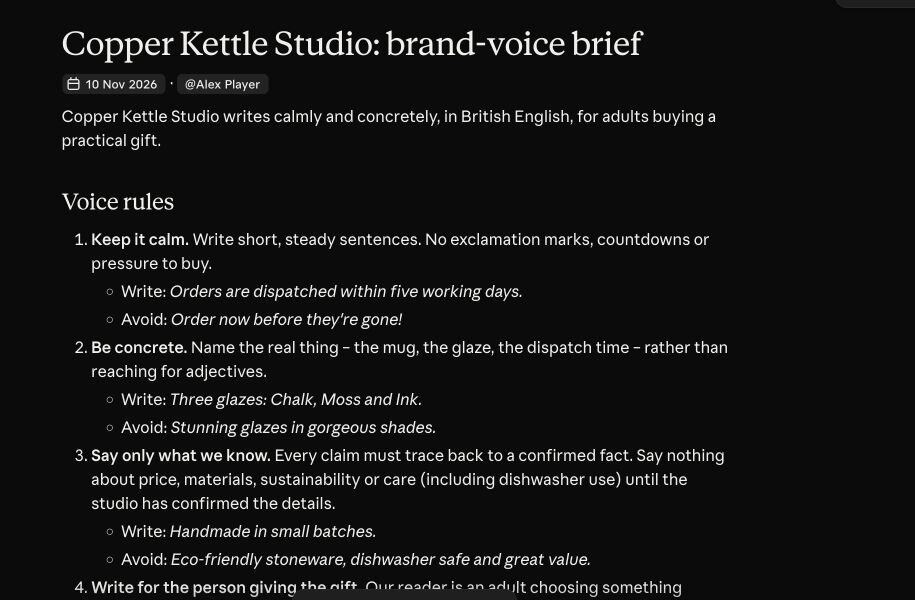
1. Choose the artifact type
Name the deliverable explicitly: for example, “an editable brand-voice document”. You can start from a chat or use a suitable template in Artifacts. Avoid asking for a dashboard or presentation merely because it looks impressive; choose the format that makes the information easier to use.
2. Supply a bounded brief
Separate approved facts, audience, tone and unanswered questions. For our fictional ceramics shop, the facts include glaze names and dispatch timing. They do not include dishwasher safety or environmental certifications. Tell Claude to keep those omissions visible instead of filling them with persuasive guesses.
3. Ask for a clear structure
Specify the sections and their purpose before the artifact is built. A compact brand reference might contain five voice rules, one example description and a facts-versus-questions table. Ask for a concise outline first when the document is longer or the structure matters.
4. Open the actual artifact
Inspect the standalone output that opens beside the conversation. Check that it contains finished content rather than an outline or progress message. A card announcing a document is not evidence that every section has been completed. If the task is still running, wait for the result before calling it ready.
5. Revise one problem at a time
Give concrete feedback such as “remove the unsupported care claim” or “shorten the first paragraph while preserving the three supplied facts”. Refer to the section or text you mean. Check the actual artifact after the edit; do not assume the chat’s description of a change means the file was updated correctly.
6. Review sharing and export
Check the document’s current access before sharing it. Open any exported file and inspect headings, tables, links and page breaks. Keep an editable source version. For a client-facing document, verify facts and commercial promises before sending it outside the drafting workflow.
A prompt to adapt
Create an editable document Artifact from this fictional brief. Sections: five observable voice rules, a three-sentence product description and a table of approved facts versus unanswered questions. Use only the supplied facts. Keep unknown claims out of the description. Show the finished document and identify any section that is still incomplete. Do not publish or share it.
Check the result
Compare the document with the original brief and confirm each requested section exists. Test one targeted revision and reopen the result. Check the exported version separately if you intend to use it; an attractive preview does not guarantee a clean exported file.
Common questions
Why do Artifacts look different from older tutorials?
Anthropic has updated the Artifacts experience. Current documents, presentations and newer artifact types may have different controls from older code-preview examples. Follow the interface and documentation for the format you are using.
What if Claude only writes in the chat?
Explicitly request the desired artifact type and check that the relevant creation features are enabled for your account. If unavailable, use the structured chat draft and keep the limitation clear.
Official references
Keep going
Keep the approved source brief in a Claude Project when the document supports recurring work. You can also build a first brief with our free prompt generator.