
An AGENTS.md file is useful when it saves the agent from rediscovering the same project facts. It works best as a compact working guide: where the code lives, how to check a change and which boundaries matter. A long collection of slogans is less useful than three commands that actually run.
Checked: 10 November 2026. Features and menu labels can vary by plan, workspace and rollout.
Before you start
A repository or project folder you can edit, a working example task and Codex. Back up or commit the starting state. Keep credentials and personal information out of project instructions, especially when the repository is shared.
1. Start at the project root
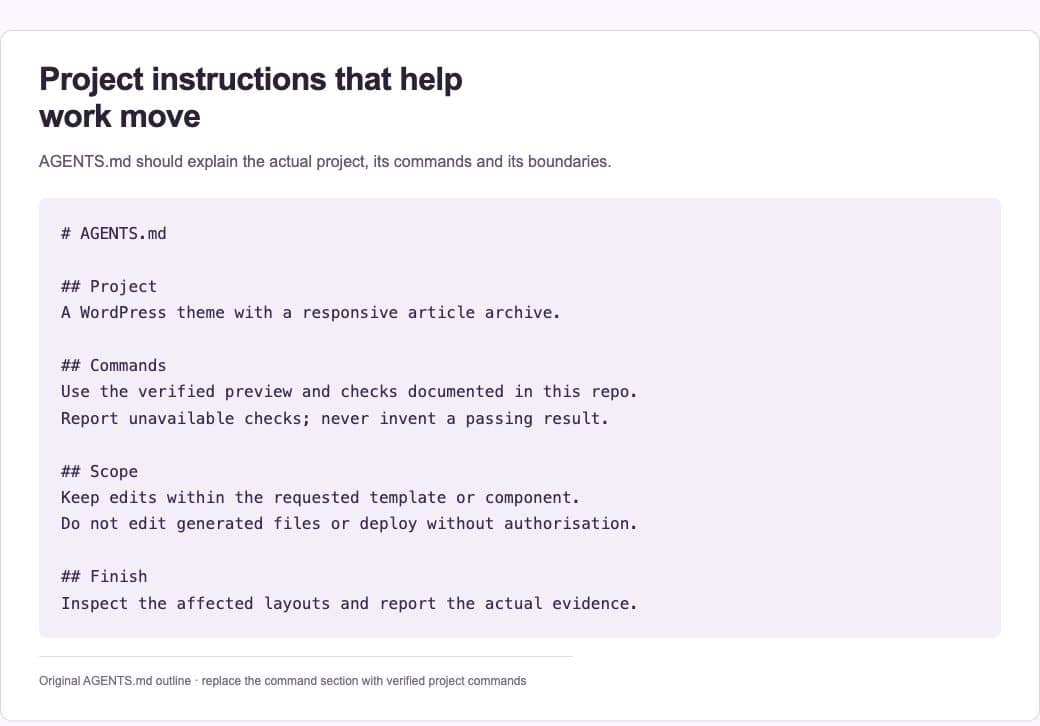
Create AGENTS.md beside the project’s main files. Briefly explain what the project does and identify the important directories. Use paths that exist in this checkout. If the repository already has instructions, update the relevant guidance instead of creating competing copies without understanding their scope.
2. Record real commands
Add the commands that install dependencies, start a preview and check relevant behaviour. Verify them yourself or have Codex run them. A guessed test command wastes time and can encourage the agent to claim a check happened when it did not. Explain any setup prerequisite that would otherwise be easy to miss.
3. State the boundaries
Name generated files, vendor code and other areas that should not be changed during ordinary tasks. Explain what requires a separate decision, such as a production deployment or a database migration. Keep these rules concrete and tied to the project.
4. Define completion
Describe the evidence a task should leave behind. A frontend change may need browser inspection at relevant widths. A logic change may need a meaningful test. Ask for a concise report of what changed, what was checked and what could not be verified.
5. Use narrower instructions carefully
Codex can discover guidance along the directory path, with more local instructions applying to that area. Add a nested file only when a subproject genuinely needs different commands or conventions. Avoid restating the root file in every directory; duplicated rules drift.
6. Test the instructions on a small task
Ask Codex to identify the project guidance it loaded and explain the planned checks before making a low-risk change. Compare the behaviour with the file. Correct ambiguous instructions based on the result, then keep the instructions with the code they describe.
A prompt to adapt
Before editing, read the applicable project instructions. Tell me which guidance applies to this directory, which commands you will use and what evidence will show the task is complete. If instructions conflict or a command does not work, report the specific issue rather than inventing a replacement result.
Check the result
A useful file should answer a new contributor’s practical questions without requiring the whole chat history. Remove stale commands and unrelated preferences. Keep it short enough to inspect. Project instructions influence behaviour, but permissions, credentials and approval controls enforce access; do not treat prose as a security boundary.
Common questions
Should I put every preference in AGENTS.md?
Put recurring project rules there. Keep one-off task requirements in the task prompt. Reusable multi-step procedures may fit a skill better than an expanding instruction file.
Why did Codex follow a different rule?
Check for more specific instructions in the working directory’s path and for configured global guidance. Confirm the directory in which the task actually ran. The filename alone does not establish which guidance was loaded.
Official references
Keep going
Move a repeated procedure into a reusable Codex skill once the procedure works. You can also build a first brief with our free prompt generator.