
A reusable skill should preserve a workflow that has earned its place. Start with a task that already produced a useful result, such as an article audit or a release checklist. Then capture the decisions, source material and checks that made it work, instead of saving a large prompt full of assumptions.
Checked: 10 November 2026. Features and menu labels can vary by plan, workspace and rollout.
Before you start
A successful example, permission to reuse its source material and Codex with skill creation available. Use a fictional or sanitised example when the original contains client details. Decide whether the skill belongs to one repository or should be available across your projects.
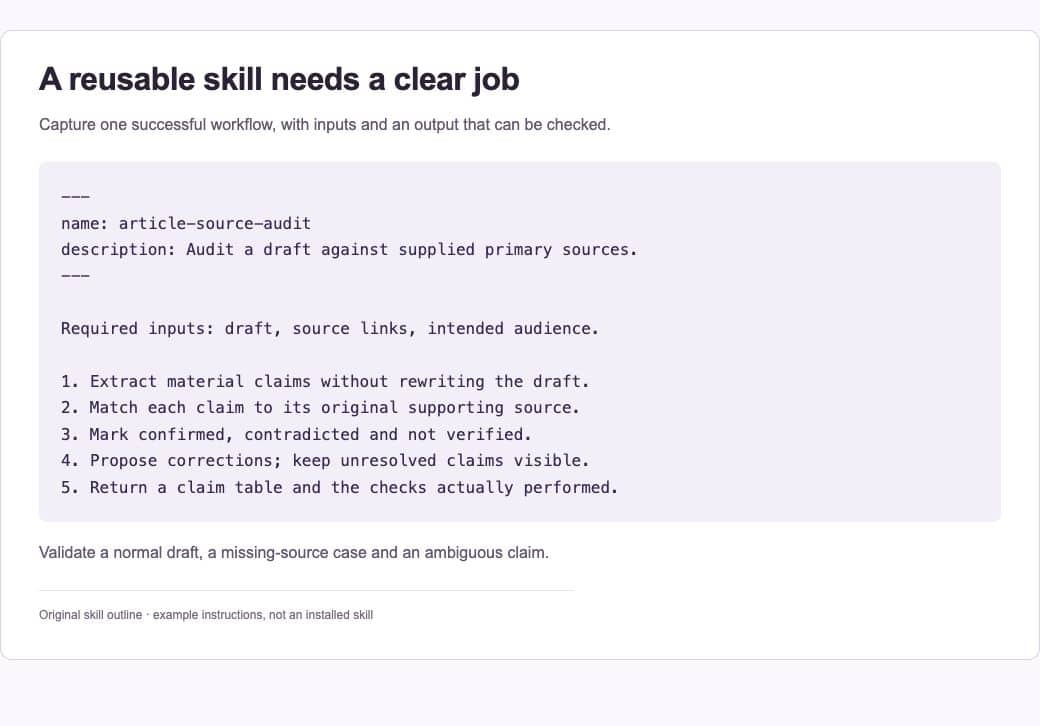
1. Choose one repeated job
Define a narrow result, such as “audit a draft against approved product documentation”. Avoid an all-purpose “make everything better” skill. List the input it needs and the output a colleague would recognise as finished.
2. Gather the useful evidence
Provide an accepted output, the instructions behind it and any commands or references that should be reused. Include a case that went wrong and the correction that fixed it. Those examples help distinguish a real process from a stylistic imitation of the final answer.
3. Ask skill-creator to scaffold it
Use the $skill-creator available in your Codex setup and describe the workflow, source material and destination. Ask it to keep the main SKILL.md concise and move longer reference material or helper scripts into appropriate supporting files.
4. Review the trigger and boundaries
The skill’s description should make it clear when to use it and when it does not apply. Check that it does not silently authorise sending messages, publishing changes or accessing unrelated accounts. A reusable procedure still needs to operate within the current task’s permissions.
5. Validate with representative inputs
Run the skill on a normal example, an incomplete input and an awkward edge case. Judge whether the result is useful, sourced and reviewable. If a helper script exists, verify its actual behaviour. A valid file structure alone does not prove the workflow works.
6. Improve it from a real correction
Invoke the new $skill-name on the next suitable task. When it uses a wrong command or misses an important condition, update the skill with the reason and a small example. Keep repository-specific procedures with the repository; keep genuinely general procedures in the appropriate personal skills location.
A prompt to adapt
Use $skill-creator to create a skill for [one repeated workflow]. Use this successful example: [example]. Required inputs: [list]. Good output: [example or criteria]. Reuse these verified commands and references: [list]. Keep SKILL.md concise, state when the skill should trigger, and validate it against a normal case, a missing-input case and an edge case. Do not add permissions beyond the task.
Check the result
Ask someone unfamiliar with the original chat to follow the skill. If they need unstated background knowledge, add the missing context or narrow the trigger. Remove copied material that does not change the result. Keep an accepted example so future edits can be compared with the original standard.
Common questions
Where does the skill live?
OpenAI’s current workflow guidance describes personal skills in ~/.codex/skills and repository skills that can be shared with the code. Follow the locations supported by your installed Codex setup.
Is a skill the same as project instructions?
They overlap, but serve different purposes. Project instructions describe the working environment and recurring rules. A skill packages a particular procedure and the resources needed to carry it out.
Official references
Keep going
Use AGENTS.md for the project’s everyday working rules. You can also build a first brief with our free prompt generator.