
If your workspace offers a custom GPT migration to plugins, treat it as a small product migration. A successful copy of instructions is only the beginning. Knowledge, tools, actions and sharing may behave differently, so a short regression checklist matters more than a reassuring “migration complete” message.
Checked: 10 November 2026. Features and menu labels can vary by plan, workspace and rollout.
Before you start
Creator access to the published custom GPT, a copy of its instructions and reference files, and access to the migration controls in the relevant workspace. OpenAI’s migration guidance is workspace-specific; do not assume a retirement date or rollout applies to every consumer, business and education account.
1. Inventory the existing workflow
Write down the three or four tasks the GPT is used for. List its instructions, knowledge files, tools, external actions and intended audience. Include a representative input and the qualities that make an output acceptable. Remove obsolete instructions before carrying them forward.
2. Find the migration control
Where supported, open My GPTs, choose the GPT you created and use Migrate to plugin. Check the destination and creator permissions. If the control is absent, consult the documentation for your account rather than following a deadline or menu path from a different workspace.
3. Review the resulting instructions and files
Compare the new plugin or skill with the inventory. Check that the right reference files are included and that filenames and internal references still make sense. Rewrite instructions that depend on old tool names or assume capabilities the replacement does not have.
4. Rebuild actions deliberately
Do not assume custom actions, model choices or tool configuration transfer unchanged. External integrations may need a separate connector or MCP-based implementation. Give each integration a clear purpose and only the access it needs. Test reading a small, non-sensitive sample before allowing consequential actions.
5. Retest the important tasks
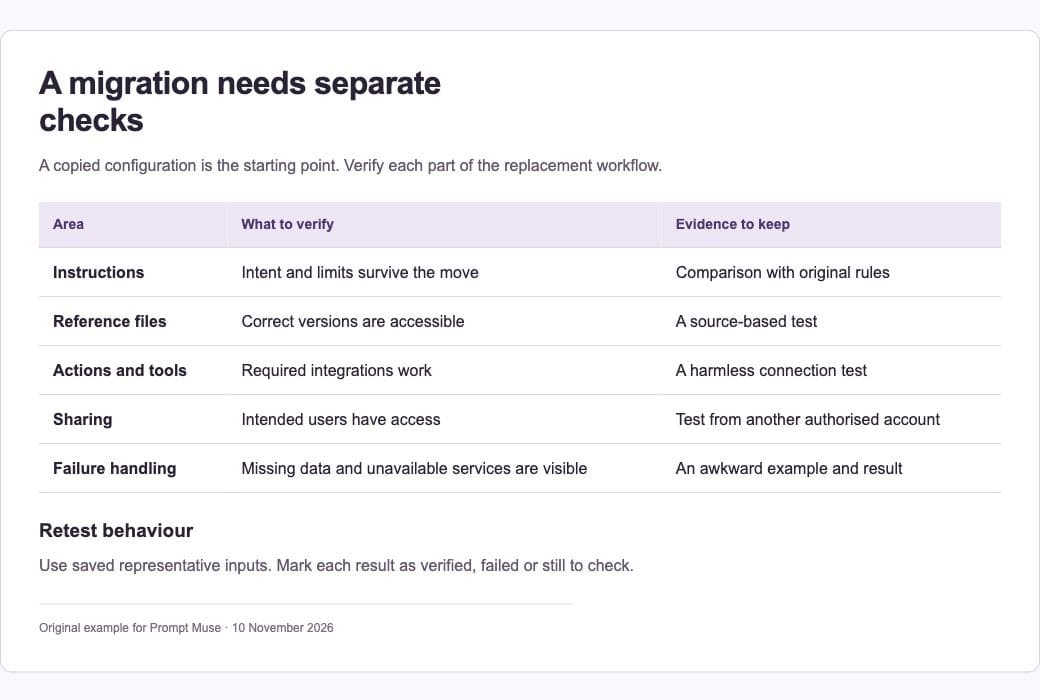
Run the saved examples and compare behaviour, not just wording. Can the replacement use the correct source, ask for a missing fact and stop at the intended boundary? Include one awkward input and one case where an external service is unavailable. Record what was actually verified.
6. Check sharing before switching people over
A migrated replacement can start private. Review its audience and share it deliberately with the intended people. Keep a short handover note with the new entry point, known differences and who maintains the reference files. Preserve a recoverable copy of the old configuration until the replacement is trusted.
A prompt to adapt
Help me audit this workflow migration. I will provide the old instructions, reference-file list and three example tasks. Build a comparison checklist covering instructions, knowledge, tools, external actions, permissions, sharing and failure handling. Separate items we have verified from items we still need to test. Do not assume an integration has migrated because its name appears in the instructions.
Check the result
Ask another authorised user to try the replacement from their own account. Creator access can hide a sharing problem. Verify one source-based task and one integration-dependent task. A configuration saved successfully is not the same as a working connection.
Common questions
Do custom actions automatically become working integrations?
Do not rely on that. OpenAI’s migration guidance identifies capabilities that need separate rebuilding or testing. Match the implementation to the actual connector and tool support in the destination.
Can I publish a universal migration deadline?
Only if the official guidance explicitly covers your audience. Workspace migration schedules can differ. Link to the current documentation and state which account type your instructions address.
Official references
Keep going
Build a reusable skill from a workflow you have already tested. You can also build a first brief with our free prompt generator.