
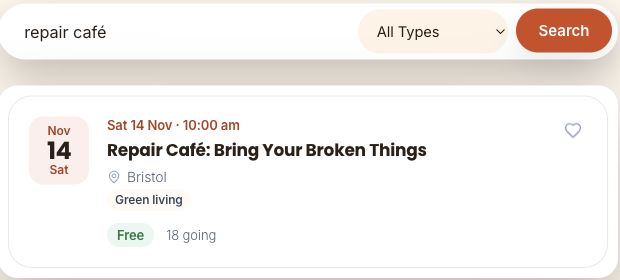
NexDirectory is a WordPress directory engine for events, business listings, job boards, marketplaces and community publishing. The useful starting point is choosing one primary job for the site. This guide follows the current official setup path and uses a genuine search screenshot from its fictional Patchwork Bristol demonstration.
Checked: 10 November 2026. Features and menu labels can vary by plan, workspace and rollout.
Before you start
A WordPress staging site, a current backup and a small set of representative listings you are entitled to publish. Start with the free plugin and a clear operating model. Read the official getting-started guide before choosing optional paid features.
1. Choose one primary profile
Decide whether the installation primarily serves Events, Directory, Job Board or Marketplace content. NexDirectory’s documentation says one profile is active per installation. Match the structured fields and public browsing experience to the audience’s main task rather than enabling unrelated content types just because they are available.
2. Install the official plugin on staging
Use the official WordPress plugin listing or the supported installation route in your WordPress dashboard. Record the installed version and read its setup guidance. Keep a backup of the starting site so configuration experiments can be reversed.
3. Configure the required pages
Assign the plugin’s documented shortcodes to the public and account pages required by your chosen workflow. Save WordPress permalinks and open each route. Check that the archive, individual listing and submission or account page resolve to the intended destination rather than a duplicate or empty page.
4. Publish representative sample data
Create one complete listing and one edge case, such as a long title, missing optional image or unusual date. Use fictional information for a trial. Give the reader enough detail to choose confidently, and use only images and descriptions you have permission to publish.
5. Build discovery around the audience
Choose the search, filters, map or calendar views the site actually needs. In the Patchwork Bristol demo, a search for repair café returns the relevant fictional event. Test both useful results and an empty search. Check the same journey on a narrow phone so filters and listing details remain usable.
6. Test the publishing and moderation journey
Choose administrator-led publishing or configure front-end submissions, ownership and moderation. Test the relevant roles on staging, including an unauthenticated visitor and an ordinary contributor. Review email, maps and any payment setup separately before inviting real users. A public demo can show discovery without proving your own configuration is ready.
A prompt to adapt
Help me plan a WordPress directory using NexDirectory for [audience and purpose]. Choose one primary profile and explain why. Return the required listing fields, public discovery views, publishing roles, moderation rules and a launch test checklist. Separate Free requirements from optional features I must verify in the current Pro documentation. Do not invent plugin capabilities or publish sample listings.
Check the result
The official guidance positions Free for unlimited basic publishing and discovery, with a separate Pro companion for additional customisation, automation and monetisation. Check the current feature comparison against your requirements. Before launch, run the complete visitor-to-listing journey and, where relevant, a submission-to-approval journey on your own staging copy.
Common questions
Can I change the site profile later?
The documented settings support a profile change, but test its effect on existing fields, labels, templates and schema on staging first. A setting being available does not guarantee an existing catalogue needs no migration work.
Do I need Pro to start?
Start with the current Free feature set when it meets the requirements. Add the separate Pro plugin for specific documented needs, and test those features in your own setup before relying on them.
Official references
Keep going
Use Search Console queries to improve your directory’s supporting guides after launch. You can also build a first brief with our free prompt generator.